
SvrGuard 內建了後門掃描程式,可以直接在 CLI 下,跑以下的程式指令做後門檢查。
後門檢查的指令
還沒裝 SvrGuard 的話,先安裝(Linux 與 Mac 都是這一行,Mac 限 Apple Silicon):
curl -fsSL https://svrguard.ofuyuan.com/install.sh | sudo sh用 root 跑後門檢查(Linux):
sudo svrguard hostcheck -config /etc/svrguard/svrguard.ini -out hostcheck.mdMac 上執行檔裝在 /usr/local/sbin,不在預設的搜尋路徑裡,要寫完整路徑:
sudo /usr/local/sbin/svrguard hostcheck -config /etc/svrguard/svrguard.ini -out hostcheck.mdSynology NAS(DSM)要先在「控制台 → 終端機和 SNMP」開啟 SSH,登入後:
sudo /var/packages/SvrGuard/target/bin/svrguard hostcheck -config /var/packages/SvrGuard/var/svrguard.ini -out hostcheck.md設定檔位置若不同,用 ps -ef | grep "svrguard run" 看 -config 後面那個路徑。
-out:報告存哪裡,不加就存在目前目錄,檔名帶時間。- 報告預設是英文;加
-lang zh-TW改成中文。
結果說明
跑完畫面上會印出報告位置和一行摘要:
Report written to hostcheck.md
hostcheck: 0 finding(s), 0 check(s) could not read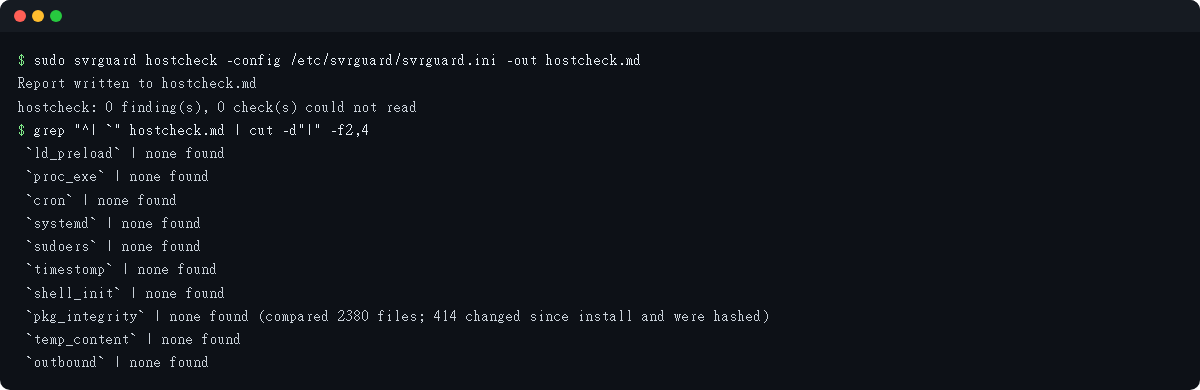
報告是一份 Markdown,下面是一台測試主機跑出來的結果:
# SvrGuard host check report (possible backdoors)

- Host: ********
- Version: svrguard 1.0.85 (r10865)
- Run as: root

## Result

| Item | What it looks at | Result |
|---|---|---|
| `ld_preload` | whether /etc/ld.so.preload has content (where user-space rootkits hook in) | none found |
| `proc_exe` | whether any running process executes from a temp or hidden path, or from a deleted file (/proc/*/exe) | none found |
| `cron` | whether any cron job runs @reboot or from a temp directory | none found |
| `systemd` | whether any systemd unit starts a program from a temp or home directory | none found |
| `sudoers` | whether sudoers grants passwordless ALL to an account that exists | none found |
| `timestomp` | whether any file in an auto-start location has a modification time before 1971 | none found |
| `shell_init` | whether a shell start-up file executes something from a temp path | none found |
| `pkg_integrity` | whether system programs and libraries still match what their package recorded (Debian/Ubuntu packages) | none found (compared 2380 files; 414 changed since install and were hashed) |
| `temp_content` | whether small files under /tmp, /var/tmp and /dev/shm (two levels) look like a reverse shell or a miner | none found |
| `outbound` | established outbound connections to a mining-pool port (3333, 4444, 5555, 7777, 14433, 14444, 45700) or to an address this host blocks | none found |

## Findings

None found.
每一項的結果只有三種:
- N found:下面「Findings」會列出是哪個檔、哪個行程、哪一行設定。
- none found:沒找到已知的手法。不等於乾淨,只代表這幾個地方沒有留下痕跡。
- could not read:權限不夠、檔案不存在、或這個平台不適用。讀不到不等於沒有,所以不會算成 none found。
裝了 SvrGuard 之後,背景服務也會定期做同樣的檢查,找到就寄信通知。hostcheck 適合剛裝好時先掃一次,或懷疑出事時當場確認。
注意事項
- 測試過的系統:Ubuntu 14.04、16.04、18.04、20.04、22.04、24.04、26.04,Debian 12,macOS 27(Apple Silicon),Synology DSM 6.2.4(armv7)、DSM 7.3。
- 要用 root 跑。不用 root 也能跑,但很多檔案和行程會讀不到,報告開頭會註明。
- 只讀不改:不刪檔、不停程式。報告檔權限是
600,只有 root 看得到。 - 只讀
/proc和檔案,核心被改過的 rootkit 看不到。 - none found 不等於乾淨,could not read 不等於沒有。
pkg_integrity只比對 Debian/Ubuntu(dpkg)的套件,其他發行版和 DSM 7.3 這一項會是 could not read。
本系列文章:主機防禦系統-SvrGuard。想了解更多 SvrGuard,歡迎造訪 SvrGuard 官方網站,有問題或想法歡迎到 SvrGuard 討論區。